 The logo looked simply great as they have created their first ever playable Google Doodle. But beware, you cannot stop stop or pause the game :) .You gotta see it to believe their unique creativity.
Friday, May 21, 2010
Google Celebrates Pac-Man's 30th Birthday
Google has changed their logo to celebrate Pac-Man's 30th birthday. Pac-Man, the famous arcade game is very popular around the world and Google did not miss the opportunity to celebrate their popularity using their doodle.  The logo looked simply great as they have created their first ever playable Google Doodle. But beware, you cannot stop stop or pause the game :) .You gotta see it to believe their unique creativity.
The logo looked simply great as they have created their first ever playable Google Doodle. But beware, you cannot stop stop or pause the game :) .You gotta see it to believe their unique creativity.
Thursday, May 20, 2010
8 Years in the SEO/SEM Industry, More to Learn
Yes, you hear it right! Just completed 8 years in the SEO/SEM industry and it has been long run since the day I started my career. As I try to walk down memory lane, I find it hard to believe that I have taken such a long journey. Be it a salary constraint or even getting pissed off with my boss, I managed to stick to the same profession and never ever thought of changing it for a single moment. Trust me the journey was not that easy as it seems. Even in my wildest dreams I never imagined that I will take up online marketing as my profession. But yes it’s a reality and I take this opportunity to quickly pen down all my thoughts that I have acquired during the last 8 years.
It all started in the year 2002, when I joined 123greetings.com, as a Search Engine Optimizer.  I was a fresher during that time and was totally a novice in terms of SEO skills. Gradually, I managed to develop the theoretical skills and started practical implementation while playing with a popular keyword “ecards”. This was the first keyword I targeted as I entered in the online world. I spent 4 years working for the same ecard industry. It was a great learning experience. But soon I realized that I am doing injustice to my 4 years of SEO knowledge by confining myself to a single industry.
April, 2006 is when the new opportunity to work on multiple industries with a good pay package came along and I did not miss the chance to grab it gleefully. I joined DigitalAvenues.com and took up the new challenge to rank websites of various niches at the top of major search engines like Google, Yahoo! and Bing.  It was a great journey during which I managed to rank websites high on various topics in the search engine rankings. But the key lesson learnt while working with multiple clients is that you have to handle clients tactfully as they are impatient. They do not know and do not want to know anything about SEO and are also not willing to give you too much time to increase their website’s ranking. It is up to us how we convince them with our report, preparation, and presentation skills.
While working at Digital Avenues, I got the opportunity to work with some of the finest talents in the field of online marketing that were available at Kolkata. I do not need to think twice in saying that the SEO team that Digital Avenues had from the year 2006 to 2008 was the best and the best team to work with. But things changed drastically from 2008 end when we were asked to work under someone who self-claimed himself as “Guru of SEO”. Thereafter, things went haywire and within a year, the entire team (including the “Guru of SEO”) was sacked. I think the self claimed “Guru of SEO” has to understand the famous quote by H.E. Luccock, “No one can whistle a symphony. It takes an orchestra to play it”.
After going through a tough time, things changed in the year 2009, August, when I finally managed to attach myself with a big brand. Yes! I got an offer from Lexmark International ( While the recruitment process at Lexmark was on, I also got interview calls from HP Bangalore (the rival company). You can call it mere coincidence or pure luck. However, since Lexmark made the offer first, so I am there today. I was never a brand fanatic but sometimes it makes one’s life easier in answering questions to people who are interested in knowing where I work as they can easily acknowledge the company without raising their eyebrows.
Life has changed to a certain extent while working at Lexmark. Job responsibilities have changed in comparison to Digital Avenues. Here I have the opportunity to work with some of best analytical tools that I had always dreamt of. To me this is a new knowledge avenue where I have to work hard to excel more in the field of analytics. So for all aspiring internet-savvy who are interested in taking up SEO as a profession, this is simple advice for you. Try to have patience, read more, work hard, and take one step at a time. Eventually, you will find that your perseverance has been paid.
During my 8 years of professional journey, there were few good and bad times. But amongst all the unavoidable hiccups, the most important thing that happened to my life is when I met my life partner. After a year and half of courtship, we finally got married in 2009. For me, life has changed a bit but it is bound to change once you are ready to take up additional responsibilities, both at work and at home.
Finally, I would like to thank all my ex-colleagues, friends, family members who have helped in my work and from whom I have learnt a lot. It would not have been possible without their support. Wishing you all best of luck in your own profession and wish me luck to accomplish some of my unfulfilled dreams in the SEO world.
Thursday, February 18, 2010
Quality Score Explained in Adwords Live Online Classroom
Day before yesterday (18th Feb, 2010, 12.30 AM IST), I did manage to attend the live online course on "Understanding Quality Score". I somehow managed to keep myself awake till 2 o'clock midnight as the entire webinar was very interesting and it went for 2 hours. Due to some technical problem from their end (Google), the session started after 10-15 mins late. While attending the webinar, I did make note of few important points which I feel sharing with you guys in case you missed that session. Given below are key understandings of Google's Adwords Quality Score:
- What is Quality Score and why is it Important?
- Quality Score is an automated measure of how relevant each of your keywords is to your ad text and to a user's search query.
- It is based on an automated algorithm that tries to determine this factor for each of your keywords in your account.
- Quality Score affects Ad Rank.
Ad Rank = Max CPC (the advertiser bidding for the keyword) x Quality Score.
So in order to rank high, you have to either increase your CPC or Quality Score or both. - High quality score will off-set a low max CPC. You can show in higher positions with a lower actual CPC. And that means you will get more clicks for less.
- Quality score means user experience
- The biggest factor in Quality Score is CTR (Click-Through-Rate). If your Ad-copy is having high CTR, that means it has a good user experience.
- Try to match your Ads and Keywords to improve their Quality Score
- Quality Score of 1 to 4 is considered poor. Anything higher than 8 is Great. The numbers that we see is not the actual number that has been put into their ranking equation. It is just to give us a general idea of what our quality score is.
- Quality Score is based on real time factors such as:
- Search Query
- Location
- Ad copy
- CTR
- and other relevance factors
- Optimum Account Structure
- Build up your account in such a manner to get high quality score.
- Do not target all the keywords for a single Ad Group.
- Try to have separate Ad Groups for a set of targeted keywords.
- Ad Group, Ad Copy and the targeted keywords should all be relevant under a Campaign.
- 5 Common Quality Score Misconceptions/Myths
- Misconception 1: There is only one Quality Score
Fact:Google uses separate Quality Scores in their equation and they are used:- Quality Score Factors to determine whether an ad will show for a particular search
- CTR on Google
- Relevance of the keyword to its ad group
- Landing Page quality
- Historical Performance (measured through CTR across all your keywords)
- Other Relevance Factors
- Quality Score Factors to rank ads
- Quality Score Factors for search
- CTR on Google
- Relevance of the keyword and Ad to the search query
- Historical Performance
- Other Relevance Factors
- Quality Score Factors for content (partner sites)
- Ad's Past Performance
- Relevance of the overall theme
- Landing Page quality
- Other Relevance Factors
- Don't automatically install software
- Don't request unnecessary personal information (have a privacy policy if you require)
- Ability to opt out of receiving marketing newsletters
- Link to a page that is about the product or service advertised in the ad
Good Landing Page Quality- Original Content (avoid mirror pages)
- Free of Malware
- Don't alter Users Browser behaviour or settings
- Avoid pop-ups, pop-unders
- Load fast or faster
- Don't use all images
Performance on content network wont affect our search quality score and vice versa. Bounce Rate on the actual landing page does not effect Quality Score
- Quality Score Factors to determine whether an ad will show for a particular search
- Misconception 2 :Using different match types (keyword match types) can improve your Quality Score
Fact: Quality Score is calculated using only data from queries that exactly match your keyword- Use only one match type - Broad is best
- Use only one match type - Broad is best
- Misconception 3 :Showing up in a higher position will benefit your Quality Score
Fact: Quality Score is normalized to compensate for differences in performance for ads in different positions- High CTR does not always equal a high Quality Score
- To improve Quality Score, you need to get a higher CTR than is average for that position and keyword
- Misconception 4 :Quality Score is reset when you optimize your account ( I will lose my Quality Score history if I optimize my account)
Fact: History of keywords, ad texts and landing pages is preserved when the account is restructured.- Visible history is reset
- History to calculate Quality Score is preserved
- Misconception 5 :If I optimize (or raise my CPCs) , my position will always improve
Fact: Adwords is an auction system and to show higher than your competitors you need to:- Increase your Quality Score faster than your competitors
- Raise your CPCs faster
- Both
In case you are in a competitive industry, then you need to architect as well as keep optimizing your account because doing nothing you can go backwards and can lose your Ad rank.
Question & Answer Session during Live Webinar
Question: Does advertising status effect organic search results?
Answer: No--your advertising status has no effect on your organic search results. Though factors that go into landing page quality and QS may also be similar to factors that affect natural search listings.
Question: Does quality score affect the page rank of my site?
Answer: Quality Score will have an effect on the rank of your ad within the sponsored links, but not on your natural search results.
Question:What QUANTITATIVE measurements can we use to gauge the QUALITY of our LANDING PAGE? Keyword Density for our ad keyword phrase? Say 3-6% keyword density is optimum?
Answer: We do not have specific metrics like you suggest for optimizing landing pages for Quality Score. Optimize your site for the user experience, and follow the guidelines outlined here: http://adwords.google.com/support/aw/bin/static.py?hl=en&page=guidelines.cs&answer=46675&adtype=text
Question: Do Conversion rates effect rankings?
Answer: No. Conversion rate is not a factor in quality score.
Question: I apologize if I missed your reply to my question. Is there any relationship between QS and Max CPC? In other words, if your QS is 10/10, what else can we do to reduce our Max CPC?
Answer: To your first question--yes. The relationship between QS and Max CPC has been covered (the higher the QS, the lower the CPC). If your QS is maxed out at 10/10, you'll still want to continue to work to improve performance--in terms of CTR and in terms of conversions, conversion rate, cost per conversion, or other metrics you use to determine success.
Question: is there a person to contact if we have questions? may we contact one of you? my email is rich.cray@storagefront.com . please email me a contact. thank you
Answer: You can contact our support team with any questions by accessing the 'Contact Us' form through the AdWords Help Center.
Question: what is conversion rate mean?
Answer: Conversion rate is the percentage of clicks that result in a conversion (sale, newsletter sign-up, or other goal of your website).
Question: Do performance stats for keywords in an adgroup/campaign affect each other? (eg low ctr on a high volume kw bringing down performance for an entire campaign)
Answer: Yes. Overall account history is taken into account for each keyword's specific quality score.
Question: how does google know when we get a conversion and a customer makes a purchase?
Answer: This is a separate topic--Google offers a free tool called 'Conversion Tracking' with AdWords (and also Google Analytics). Search the Help Center for more information on these topics.
Question: Is it better to have a lot of keywoods or just a few?
Answer: We recommend about 30 or so per ad group, but continue to monitor this list so that any poorly performing keywords are removed and to not impact quality score across the board.
Question: ids the quality score that you can see in the keyword list a combination of the poor keyword to the landing page or is it the landing page? how do you find the quality score for the landing page? (i did see the link you recommended to look at for landing page tips)
Answer: If you hover your mouse over the speech bubble next to your keywords on the keywords tab, you can see the breakdown between landing page quality, load time, and keyword relevance.
Question: Does pausing a poorly performing keyword have the same effect as deleting it?
Answer: The historical performance of paused or deleted ads and keywords will continue to affect your account history. However, recent history weighs more heavily in QS, so as long as a keyword is not running (paused or deleted, no difference), its past performance will be outweighed by more recent activity.
Question: in a ad group how do we find a specific keyword that has a low QS?
Answer: You can customize your columns on the keywords tab to show quality score.
Question: When talking about LP quality, do you consider other pages on the site? Does it follow forms?
Answer: We examine the entire domain.
Question: does pausing an ad group have the same effect as deleting it in terms of CTR and Q scores?
Answer: Yes.
Question: Considering the pass-fail, does that mean I should not spend time tweaking terms to make sure they match keywords and ads, etc.?
Answer: As Tali just mentioned, you can see if landing page is effecting you quality score by hovering your mouse over the speech bubble next to a given keyword. If it says 'landing page quality: no problems' your page is fine.
Question: how do you know which type of match your keywords are?
Answer: ''keyword'' is phrase match, [keyword] is exact match and keyword is broad match.
Question: jake M: How is keyword relevance calculated?
Answer: Keyword relevance is determined by a number of factors, many of which are not disclosed (even to me). However, ensure the keyword is relevant to both your ad and the landing page--including the keyword itself in both places helps. The biggest factor, though, is CTR--if users are searching for your keyword but not clicking on your ad, that is the strongest signal to the AdWords system that your keyword and ad are simply not relevant.
Question: I still can't find how to view the quality score
Answer: If you go to your keywords tab and select 'columns' below the tabs, you can check the box next to Quality Score to add this column in for all of your keywords.
Question: what is considered an acceptable CTR? 5%?
Answer: 1% on search, .1% on content
Question: I'm hovering over the keywords and am getting no ''speech bubbles''. Would a firefox option disable that?
Answer: If you're on the keywords tab, the speech bubble is next to the word 'Eligible' in the 'Status' column.
Question: how come sometimes we see our bid is considered too low to appear on first page yet average position is still a low number?
Answer: The first page bid estimates are dynamic and based on your competition. So if your competitors increase their bids, you may have been ranking high yesterday but are not not able to achieve first page position.
Question: is the ctr for content usually lower?
Answer: Yes. Above .1% CTR on content is good.
Question: How do I differentiate between search and content CTR?
Answer: If you're on the keywords tab and scroll to the bottom of the table, you can see metrics for 'total search' and 'total content.'
Question: If broad and exact give the same quality score, why not just make all keywords broad, thereby get more exposure without hurting the quality score?
Answer: This call is entirely yours to make--with broad match keywords, you will get much more exposure, however this could result in getting a higher percentage of clicks that aren't resulting in sales/conversions. You'll likely want to use a mix of match types and negative keywords to refine and optimize your keyword list for the best return-on-investment.
Question: I have a keyword and I hovered over it and my Landing Page, Relative Keyword, and Landing Page load time is No problem. Why do I have a low QS? My ads do not show up for it either?
Answer: It's likely that the system has determined that this keyword may not perform well for you, based on the factors covered earlier. You can improve the QS by 'proving the system wrong' and maintaining a high CTR for t
Question: negative keyword is what again? thx
Answer: A negative keyword filters out irrelevant impressions from match expansions. For example, if you sell wicker baskets but not basket balls, you may want to add 'balls' as a negative keyword.
Question: If I have an account with a very bad history of qs nd ctr, how long might I wait to see results from an optimization overall?
Answer: This can vary, but in general the system begins to recognize the improvement in performance once you maintain a high CTR for several thousand impressions. Again, there's no hard number here, and it varies by account/keyword.
Question: I'm in Rm#2 and only see a grey screen. Is room#1 seeing the same?
Answer: Yes. The presentation is not working at the moment. Sorry!
Question: How many ads per ad group is suggested?
Answer: We recommend about 3 ad texts per ad group.
Question: How is keyword relevance calculated?
Answer: I already answered this: Keyword relevance is determined by a number of factors, many of which are not disclosed (even to me). However, ensure the keyword is relevant to both your ad and the landing page--including the keyword itself in both places helps. The biggest factor, though, is CTR--if users are searching for your keyword but not clicking on your ad, that is the strongest signal to the AdWords system that your keyword and ad are simply not relevant.
Question: Does keyword insertion helps to increase the CTR%?
Answer: It can. If users find your ads more relevant due to insertion and then click on them more often as a result, your CTR will improve
Question: So is she saying if I have a keyword paused, but I have it another ad group that is active? that they are hurting each other?
Answer: I would remove any duplicate keywords in the account as if both are active they will compete with one another.
Question: what is the threshold that determines a ''poor'' quality - is it 4, 3?
Answer: 1-3 are considered 'poor', though getting a '4' doesn't necessarily mean you should stop trying to improve
Question: where can I find the bid recommendation for keywords?
Answer: In the status column on the keywords tab. You will see bid recommendations if you're currently below the first page bid estimate. Otherwise, it will say 'eligible.'
Question: do you recommend having both a singular and plural form of the keyword in a campaign?
Answer: Yes. This allows you to capitalize on more relevant keywords.
Question: Is there any value to having keywords all at the campaign level?
Answer: This is not possible--keywords are housed in ad groups, which are housed in campaigns.
Question: But you can have keywords at the campaign level?
Answer: No. Keywords are added at the ad group level.
Question: Well lets say one keyword is paused, but its active in another adgroup...is it affecting each other?
Answer: The keyword's history is relevant at the account level, so both of the keywords' history will factor. However, the keyword that is active will have a higher weight here, as recent history is more important than older history.
Question: can you have negative keywords at the campaign level?
Answer: Negative keywords can be added at the ad group or campaign lev
Question: does the word order matter for a keyword? 'fresh roses' vs. 'roses fresh' - should an ad group use both or does it not matter?
Answer: I would recommend both to cover your bases.
Question: In general it is a good idea to insert the keyword(s) for your ad group into the ads themselves?
Answer: YES - this lets the advertiser see immediately that whay they searched for is what you are offering, resulting (hopefully) in a higher CTR for you.
Question: What is the recommended number of keywords tied to each ad?
Answer: In a given ad group we recommend no more than 30.
Question: what is the maximum number of keywords that can be there in an adgroup
Answer: Make sure to keep your keywords tightly themed and closely related to your ad text.
Question: how is the QS determined if a keyword has no impressions
Answer: New keywords with no impressions still have a QS assigned. As there is no history in your account for this keyword, the other factors of QS determine the keyword's QS, including how the keyword has performed for other advertisers.
Question: Does clicks from content have the same effect on qs?
Answer: The Quality Score for calculating an ad's eligibility to appear on a particular content site, as well as the ad's position on that site, consists of the following factors: the ad's past performance on this and similar sites, the relevance of the ads and keywords in the ad group to the site, the quality of your landing page
Question: How do you move words to make new campaigns
Answer: If you create a new campaign with new ad groups, you can move keywords from one ad group to another by checking the box to the left of the keyword you'd like to move, selecting 'more actions' and then 'copy' and selecting the new ad group where you'd like to place it.
Question: what is the single most important factor to determining quality score, you didnt say
Answer: I would focus on click through rate. There are many important factors, but this one is crucial to maintaining a strong quality score.
Question: Can I target competitors name in my keywords list (considering we are in the same business) and still have high quality score?
Answer: This is possible, but generally unlikely. This is because users searching directly for a specific brand or company are usually looking for that specific brand or company, resulting in lower CTR and relevance for you. You can certainly try, and if you can maintain high CTR doing this you may see good QS, but again, this typically does not happen.
Question: How do IMAGE ads and keywords interact since, unlike text ads, they CANNOT contain the actual KEYWORDS?
Answer: Image ads can only show on the content network, so will be placed on sites based on the theme of your keywords and how they match up to content pages. The quality score for content is not attributed to a specific keyword.
Question: Can keywords be listed in alphabetical order in campaigns, and how can i do this?
Answer: If you sort by clicking on the header 'Keyword' in the first column on the left within the keywords tab.
Question: What is the difference between the ads that appear at the top of the page and the ones that appear on the right hand side? Are they just lower ranked ads?
Answer: Yes--ads at the top have excellent QS and a sufficient bid to reach that 'top placement.' Ads on the right hand side are lower-ranked ads.
Question: what are the biggest things we can do to impact quality score
Answer: If your landing page has no problems, focus on CTR.
Question: you pay more, you get high CTR? right?
Answer: Not necessarily. You need to have compelling ad text to entice users to actually click on the ads. Having a high bid can get you a good ad rank, but a user will only click on the ad if they're intrigued by your ad text.
Question: What is a good way to decide what campaigns to make if you are selling a lot of different products on your website?
Answer: You should mirror your account structure to your site, so breaking out separate ad groups for your different products or services. You may consider different campaigns rather than ad groups if you'd like to divide up your budget or set different geo-targeting.
Question: when is the next webinar on a different topic?
Answer: In three weeks, we'll do a webinar on Landing Page advice.
Question: how many keywords per adgroup/ad do you recommend? how many adgroups per campaign? why only 3 ads recommends for adgroup? seems low to me
Answer: This can vary, but typically once you have more than 10-20 keywords in an ad group, it's likely you could further refine your keyword lists/ads by breaking the keywords out into even more specific ad groups and targeting these keywords with more specific ads. Put as many ads as you'd like to try out in the ad group--the default setting is to show better performing ads more frequently anyway, so it's essentially an experiment and an optimization performed automatically.
Question: If CTR is the biggest determiner of QS, then how can Google determine QS on a brand new campaign for a brand new account?
Answer: We look at historical factors for the keyword across all of google as well as the account's overall history, and then give keywords the benefit of the doubt for a period as it accrues its own specific CTR and performance history. This is why you sometimes see keywords with a high QS for a few days when they're first added, and then a sharp drop once we have enough information to determine poor performance.
Question: Do I receive your slides automatically along with the vocal part or do I need to request them?
Answer: An email will be sent out (likely tomorrow) to EVERYONE, and it will include the presentation and a recording. The recording may be an earlier recording from a different market due to the technical issues we experienced today, but the material covered is the same.
Question: also, is there a Support Chat url for GG Adwords that would be similar to this chat in here ... ? that would be really great
Answer: If you go to the AdWords Help Center, we often have chat support available depending on the availability of our representatives.
Question: what is a good resource for passing the AdWords qualification exam outside of the learning center?
Answer: Definitely check out the videos on the new AdWords Online Classroom: http://adwords.google.com/support/aw/bin/static.py?hl=en_US&page=webinars.cs
Question: Is there a way to find out which ads win a certain bid and how much they paid? Or any other info on them so that you know where you stand with your competitors?
Answer: You can see your average CPC for a given ad if you go to the 'ads' tab. If you look at the average CPC as compared to the average position, you can see how you're performing.
Question: what about setting up keywords for multiple similar websites - will these compete with one another (if for example, you have websites in North America & UK)
Answer: If they are targeting the same areas, then yes. If you are targeting the US website to just the US, and the UK website to just the UK, then the keywords will not be competing with each other.
Question: what is the difference between ad group and new campaign?
Answer: You can create multiple ad groups within a given campaign. At the campaign level you can select your budget and geotargeting, and at the ad group level create your keywords and ad texts.
Question: Does AdWords see FL the same as Florida?
Answer: FL can expand out to Florida if its in broad match, but you may want to add in both variations to cover your bases.
Question: what's the AdWords qualification exam?
Answer: It's called the Google Advertising Professionals program, more info here: https://adwords.google.com/professionals/
Question: Is there a limit to how many ad groups you can have in a campaign
Answer: 2000 ad groups per campaign
Question: how accurate is geotargeting really? is it better to use national instead?
Answer: If you have a local business, geotargeting is going to allow you to reach a much more targeted audience.
Question: How can you use multiple URLs for the destinations.
Answer: You can set keyword level URLs by customizing columns on the keywords tab and selecting 'Destination Url.'
Question: If goggle give the benefit of the doubt for QS on new account keywords, then how come I've gotten messages that the bid isn't high enough to appear on page 1? Seems to me that the benefit of the doubt would allow it until it proved itself a total disaster as far as QS.
Answer: I understand what you are saying, but it would be impossible to give a generous 'benefit of the doubt' for every keyword added to an account. The system relies on the keyword's performance across all accounts as well as other factors to get a 'starting point' QS. Otherwise, spammers and other low-quality advertisers (not implying this is you!) would be able to start new accounts and see good results for at least a short period of time for high-value or high-traffic keywords, resulting in search results pages clogged with poor quality ads. This would be a terrible user experience.
Question: can you have geotargeting for one website and national for the other, then will the keywords be competing?
Answer: If you're using the same keywords in both campaigns, you should exclude the local region in your national campaign so you have one campaign locally targeted to that area, and one for the rest of the country without overlap. You can set up location exclusion from the location targeting on the settings tab.
Question: My business has a 10 mile radius and I use geotargeting. But, I'd like to refine that to a smaller area and fewer communities. I tried using the Google to do that and it failed completely. Will you be providing better geotargeting in the future?
Answer: I hear what you're saying here. The trouble is, location is determined at a local level by IP address, which starts to get inaccurate when you get more specific than a 10-mile radius.
Question: If you have the same keyword in multiple campaigns, and it says it will not double serve, what should be done,
Answer: Remove duplicate keywords so that you dont have to worry about competing with yourself.
Question: Does advertising status effect organic search results?
Answer: No--your advertising status has no effect on your organic search results. Though factors that go into landing page quality and QS may also be similar to factors that affect natural search listings.
Question: Does quality score affect the page rank of my site?
Answer: Quality Score will have an effect on the rank of your ad within the sponsored links, but not on your natural search results.
Question:What QUANTITATIVE measurements can we use to gauge the QUALITY of our LANDING PAGE? Keyword Density for our ad keyword phrase? Say 3-6% keyword density is optimum?
Answer: We do not have specific metrics like you suggest for optimizing landing pages for Quality Score. Optimize your site for the user experience, and follow the guidelines outlined here: http://adwords.google.com/support/aw/bin/static.py?hl=en&page=guidelines.cs&answer=46675&adtype=text
Question: Do Conversion rates effect rankings?
Answer: No. Conversion rate is not a factor in quality score.
Question: I apologize if I missed your reply to my question. Is there any relationship between QS and Max CPC? In other words, if your QS is 10/10, what else can we do to reduce our Max CPC?
Answer: To your first question--yes. The relationship between QS and Max CPC has been covered (the higher the QS, the lower the CPC). If your QS is maxed out at 10/10, you'll still want to continue to work to improve performance--in terms of CTR and in terms of conversions, conversion rate, cost per conversion, or other metrics you use to determine success.
Question: is there a person to contact if we have questions? may we contact one of you? my email is rich.cray@storagefront.com . please email me a contact. thank you
Answer: You can contact our support team with any questions by accessing the 'Contact Us' form through the AdWords Help Center.
Question: what is conversion rate mean?
Answer: Conversion rate is the percentage of clicks that result in a conversion (sale, newsletter sign-up, or other goal of your website).
Question: Do performance stats for keywords in an adgroup/campaign affect each other? (eg low ctr on a high volume kw bringing down performance for an entire campaign)
Answer: Yes. Overall account history is taken into account for each keyword's specific quality score.
Question: how does google know when we get a conversion and a customer makes a purchase?
Answer: This is a separate topic--Google offers a free tool called 'Conversion Tracking' with AdWords (and also Google Analytics). Search the Help Center for more information on these topics.
Question: Is it better to have a lot of keywoods or just a few?
Answer: We recommend about 30 or so per ad group, but continue to monitor this list so that any poorly performing keywords are removed and to not impact quality score across the board.
Question: ids the quality score that you can see in the keyword list a combination of the poor keyword to the landing page or is it the landing page? how do you find the quality score for the landing page? (i did see the link you recommended to look at for landing page tips)
Answer: If you hover your mouse over the speech bubble next to your keywords on the keywords tab, you can see the breakdown between landing page quality, load time, and keyword relevance.
Question: Does pausing a poorly performing keyword have the same effect as deleting it?
Answer: The historical performance of paused or deleted ads and keywords will continue to affect your account history. However, recent history weighs more heavily in QS, so as long as a keyword is not running (paused or deleted, no difference), its past performance will be outweighed by more recent activity.
Question: in a ad group how do we find a specific keyword that has a low QS?
Answer: You can customize your columns on the keywords tab to show quality score.
Question: When talking about LP quality, do you consider other pages on the site? Does it follow forms?
Answer: We examine the entire domain.
Question: does pausing an ad group have the same effect as deleting it in terms of CTR and Q scores?
Answer: Yes.
Question: Considering the pass-fail, does that mean I should not spend time tweaking terms to make sure they match keywords and ads, etc.?
Answer: As Tali just mentioned, you can see if landing page is effecting you quality score by hovering your mouse over the speech bubble next to a given keyword. If it says 'landing page quality: no problems' your page is fine.
Question: how do you know which type of match your keywords are?
Answer: ''keyword'' is phrase match, [keyword] is exact match and keyword is broad match.
Question: jake M: How is keyword relevance calculated?
Answer: Keyword relevance is determined by a number of factors, many of which are not disclosed (even to me). However, ensure the keyword is relevant to both your ad and the landing page--including the keyword itself in both places helps. The biggest factor, though, is CTR--if users are searching for your keyword but not clicking on your ad, that is the strongest signal to the AdWords system that your keyword and ad are simply not relevant.
Question: I still can't find how to view the quality score
Answer: If you go to your keywords tab and select 'columns' below the tabs, you can check the box next to Quality Score to add this column in for all of your keywords.
Question: what is considered an acceptable CTR? 5%?
Answer: 1% on search, .1% on content
Question: I'm hovering over the keywords and am getting no ''speech bubbles''. Would a firefox option disable that?
Answer: If you're on the keywords tab, the speech bubble is next to the word 'Eligible' in the 'Status' column.
Question: how come sometimes we see our bid is considered too low to appear on first page yet average position is still a low number?
Answer: The first page bid estimates are dynamic and based on your competition. So if your competitors increase their bids, you may have been ranking high yesterday but are not not able to achieve first page position.
Question: is the ctr for content usually lower?
Answer: Yes. Above .1% CTR on content is good.
Question: How do I differentiate between search and content CTR?
Answer: If you're on the keywords tab and scroll to the bottom of the table, you can see metrics for 'total search' and 'total content.'
Question: If broad and exact give the same quality score, why not just make all keywords broad, thereby get more exposure without hurting the quality score?
Answer: This call is entirely yours to make--with broad match keywords, you will get much more exposure, however this could result in getting a higher percentage of clicks that aren't resulting in sales/conversions. You'll likely want to use a mix of match types and negative keywords to refine and optimize your keyword list for the best return-on-investment.
Question: I have a keyword and I hovered over it and my Landing Page, Relative Keyword, and Landing Page load time is No problem. Why do I have a low QS? My ads do not show up for it either?
Answer: It's likely that the system has determined that this keyword may not perform well for you, based on the factors covered earlier. You can improve the QS by 'proving the system wrong' and maintaining a high CTR for t
Question: negative keyword is what again? thx
Answer: A negative keyword filters out irrelevant impressions from match expansions. For example, if you sell wicker baskets but not basket balls, you may want to add 'balls' as a negative keyword.
Question: If I have an account with a very bad history of qs nd ctr, how long might I wait to see results from an optimization overall?
Answer: This can vary, but in general the system begins to recognize the improvement in performance once you maintain a high CTR for several thousand impressions. Again, there's no hard number here, and it varies by account/keyword.
Question: I'm in Rm#2 and only see a grey screen. Is room#1 seeing the same?
Answer: Yes. The presentation is not working at the moment. Sorry!
Question: How many ads per ad group is suggested?
Answer: We recommend about 3 ad texts per ad group.
Question: How is keyword relevance calculated?
Answer: I already answered this: Keyword relevance is determined by a number of factors, many of which are not disclosed (even to me). However, ensure the keyword is relevant to both your ad and the landing page--including the keyword itself in both places helps. The biggest factor, though, is CTR--if users are searching for your keyword but not clicking on your ad, that is the strongest signal to the AdWords system that your keyword and ad are simply not relevant.
Question: Does keyword insertion helps to increase the CTR%?
Answer: It can. If users find your ads more relevant due to insertion and then click on them more often as a result, your CTR will improve
Question: So is she saying if I have a keyword paused, but I have it another ad group that is active? that they are hurting each other?
Answer: I would remove any duplicate keywords in the account as if both are active they will compete with one another.
Question: what is the threshold that determines a ''poor'' quality - is it 4, 3?
Answer: 1-3 are considered 'poor', though getting a '4' doesn't necessarily mean you should stop trying to improve
Question: where can I find the bid recommendation for keywords?
Answer: In the status column on the keywords tab. You will see bid recommendations if you're currently below the first page bid estimate. Otherwise, it will say 'eligible.'
Question: do you recommend having both a singular and plural form of the keyword in a campaign?
Answer: Yes. This allows you to capitalize on more relevant keywords.
Question: Is there any value to having keywords all at the campaign level?
Answer: This is not possible--keywords are housed in ad groups, which are housed in campaigns.
Question: But you can have keywords at the campaign level?
Answer: No. Keywords are added at the ad group level.
Question: Well lets say one keyword is paused, but its active in another adgroup...is it affecting each other?
Answer: The keyword's history is relevant at the account level, so both of the keywords' history will factor. However, the keyword that is active will have a higher weight here, as recent history is more important than older history.
Question: can you have negative keywords at the campaign level?
Answer: Negative keywords can be added at the ad group or campaign lev
Question: does the word order matter for a keyword? 'fresh roses' vs. 'roses fresh' - should an ad group use both or does it not matter?
Answer: I would recommend both to cover your bases.
Question: In general it is a good idea to insert the keyword(s) for your ad group into the ads themselves?
Answer: YES - this lets the advertiser see immediately that whay they searched for is what you are offering, resulting (hopefully) in a higher CTR for you.
Question: What is the recommended number of keywords tied to each ad?
Answer: In a given ad group we recommend no more than 30.
Question: what is the maximum number of keywords that can be there in an adgroup
Answer: Make sure to keep your keywords tightly themed and closely related to your ad text.
Question: how is the QS determined if a keyword has no impressions
Answer: New keywords with no impressions still have a QS assigned. As there is no history in your account for this keyword, the other factors of QS determine the keyword's QS, including how the keyword has performed for other advertisers.
Question: Does clicks from content have the same effect on qs?
Answer: The Quality Score for calculating an ad's eligibility to appear on a particular content site, as well as the ad's position on that site, consists of the following factors: the ad's past performance on this and similar sites, the relevance of the ads and keywords in the ad group to the site, the quality of your landing page
Question: How do you move words to make new campaigns
Answer: If you create a new campaign with new ad groups, you can move keywords from one ad group to another by checking the box to the left of the keyword you'd like to move, selecting 'more actions' and then 'copy' and selecting the new ad group where you'd like to place it.
Question: what is the single most important factor to determining quality score, you didnt say
Answer: I would focus on click through rate. There are many important factors, but this one is crucial to maintaining a strong quality score.
Question: Can I target competitors name in my keywords list (considering we are in the same business) and still have high quality score?
Answer: This is possible, but generally unlikely. This is because users searching directly for a specific brand or company are usually looking for that specific brand or company, resulting in lower CTR and relevance for you. You can certainly try, and if you can maintain high CTR doing this you may see good QS, but again, this typically does not happen.
Question: How do IMAGE ads and keywords interact since, unlike text ads, they CANNOT contain the actual KEYWORDS?
Answer: Image ads can only show on the content network, so will be placed on sites based on the theme of your keywords and how they match up to content pages. The quality score for content is not attributed to a specific keyword.
Question: Can keywords be listed in alphabetical order in campaigns, and how can i do this?
Answer: If you sort by clicking on the header 'Keyword' in the first column on the left within the keywords tab.
Question: What is the difference between the ads that appear at the top of the page and the ones that appear on the right hand side? Are they just lower ranked ads?
Answer: Yes--ads at the top have excellent QS and a sufficient bid to reach that 'top placement.' Ads on the right hand side are lower-ranked ads.
Question: what are the biggest things we can do to impact quality score
Answer: If your landing page has no problems, focus on CTR.
Question: you pay more, you get high CTR? right?
Answer: Not necessarily. You need to have compelling ad text to entice users to actually click on the ads. Having a high bid can get you a good ad rank, but a user will only click on the ad if they're intrigued by your ad text.
Question: What is a good way to decide what campaigns to make if you are selling a lot of different products on your website?
Answer: You should mirror your account structure to your site, so breaking out separate ad groups for your different products or services. You may consider different campaigns rather than ad groups if you'd like to divide up your budget or set different geo-targeting.
Question: when is the next webinar on a different topic?
Answer: In three weeks, we'll do a webinar on Landing Page advice.
Question: how many keywords per adgroup/ad do you recommend? how many adgroups per campaign? why only 3 ads recommends for adgroup? seems low to me
Answer: This can vary, but typically once you have more than 10-20 keywords in an ad group, it's likely you could further refine your keyword lists/ads by breaking the keywords out into even more specific ad groups and targeting these keywords with more specific ads. Put as many ads as you'd like to try out in the ad group--the default setting is to show better performing ads more frequently anyway, so it's essentially an experiment and an optimization performed automatically.
Question: If CTR is the biggest determiner of QS, then how can Google determine QS on a brand new campaign for a brand new account?
Answer: We look at historical factors for the keyword across all of google as well as the account's overall history, and then give keywords the benefit of the doubt for a period as it accrues its own specific CTR and performance history. This is why you sometimes see keywords with a high QS for a few days when they're first added, and then a sharp drop once we have enough information to determine poor performance.
Question: Do I receive your slides automatically along with the vocal part or do I need to request them?
Answer: An email will be sent out (likely tomorrow) to EVERYONE, and it will include the presentation and a recording. The recording may be an earlier recording from a different market due to the technical issues we experienced today, but the material covered is the same.
Question: also, is there a Support Chat url for GG Adwords that would be similar to this chat in here ... ? that would be really great
Answer: If you go to the AdWords Help Center, we often have chat support available depending on the availability of our representatives.
Question: what is a good resource for passing the AdWords qualification exam outside of the learning center?
Answer: Definitely check out the videos on the new AdWords Online Classroom: http://adwords.google.com/support/aw/bin/static.py?hl=en_US&page=webinars.cs
Question: Is there a way to find out which ads win a certain bid and how much they paid? Or any other info on them so that you know where you stand with your competitors?
Answer: You can see your average CPC for a given ad if you go to the 'ads' tab. If you look at the average CPC as compared to the average position, you can see how you're performing.
Question: what about setting up keywords for multiple similar websites - will these compete with one another (if for example, you have websites in North America & UK)
Answer: If they are targeting the same areas, then yes. If you are targeting the US website to just the US, and the UK website to just the UK, then the keywords will not be competing with each other.
Question: what is the difference between ad group and new campaign?
Answer: You can create multiple ad groups within a given campaign. At the campaign level you can select your budget and geotargeting, and at the ad group level create your keywords and ad texts.
Question: Does AdWords see FL the same as Florida?
Answer: FL can expand out to Florida if its in broad match, but you may want to add in both variations to cover your bases.
Question: what's the AdWords qualification exam?
Answer: It's called the Google Advertising Professionals program, more info here: https://adwords.google.com/professionals/
Question: Is there a limit to how many ad groups you can have in a campaign
Answer: 2000 ad groups per campaign
Question: how accurate is geotargeting really? is it better to use national instead?
Answer: If you have a local business, geotargeting is going to allow you to reach a much more targeted audience.
Question: How can you use multiple URLs for the destinations.
Answer: You can set keyword level URLs by customizing columns on the keywords tab and selecting 'Destination Url.'
Question: If goggle give the benefit of the doubt for QS on new account keywords, then how come I've gotten messages that the bid isn't high enough to appear on page 1? Seems to me that the benefit of the doubt would allow it until it proved itself a total disaster as far as QS.
Answer: I understand what you are saying, but it would be impossible to give a generous 'benefit of the doubt' for every keyword added to an account. The system relies on the keyword's performance across all accounts as well as other factors to get a 'starting point' QS. Otherwise, spammers and other low-quality advertisers (not implying this is you!) would be able to start new accounts and see good results for at least a short period of time for high-value or high-traffic keywords, resulting in search results pages clogged with poor quality ads. This would be a terrible user experience.
Question: can you have geotargeting for one website and national for the other, then will the keywords be competing?
Answer: If you're using the same keywords in both campaigns, you should exclude the local region in your national campaign so you have one campaign locally targeted to that area, and one for the rest of the country without overlap. You can set up location exclusion from the location targeting on the settings tab.
Question: My business has a 10 mile radius and I use geotargeting. But, I'd like to refine that to a smaller area and fewer communities. I tried using the Google to do that and it failed completely. Will you be providing better geotargeting in the future?
Answer: I hear what you're saying here. The trouble is, location is determined at a local level by IP address, which starts to get inaccurate when you get more specific than a 10-mile radius.
Question: If you have the same keyword in multiple campaigns, and it says it will not double serve, what should be done,
Answer: Remove duplicate keywords so that you dont have to worry about competing with yourself.
Wednesday, September 16, 2009
Adobe to Acquire Omniture for $1.8 Billion

Omniture has announced yesterday through their press release that Adobe Systems Inc. is going to buy business software maker Omniture Inc. for $1.8 billion ($21.50 per share) on a fully diluted equity-value basis. It is going to be a smart move that Adobe has taken as it is going to add more values that Adobe is delivering to its customers.
 Adobe’s acquisition of Omniture furthers its mission to revolutionize the way the world engages with ideas and information. Adobe CEO Shantanu Narayen called the move a "game changer" for the company.
"Adobe customers are looking to us for solutions to deliver engaging experiences and more effectively monetize their content and applications online," Narayen said in the press release announcing the deal.
The two companies said the deal is expected to close during Adobe's fourth quarter and is subject to government approvals. Omniture will become a new unit within Adobe, with Omniture CEO Josh James continuing to lead the business as an Adobe senior vice president. Adobe said the deal should add to earnings in fiscal 2010.
Omniture shares soared 25 percent to $21.74 in after-hours trading, while Adobe shares slid 4.5 percent to $34.06. The deal would be Adobe's second-largest acquisition after its $3.4 billion purchase of Macromedia in December 2005.
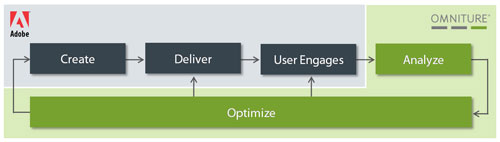 By combining Adobe’s content creation tools and ubiquitous clients with Omniture’s Web analytics, measurement and optimization technologies, Adobe will be well positioned to deliver solutions that can transform the future of engaging experiences and e-commerce across all digital content, platforms and devices.
Adobe’s acquisition of Omniture furthers its mission to revolutionize the way the world engages with ideas and information. Adobe CEO Shantanu Narayen called the move a "game changer" for the company."Adobe customers are looking to us for solutions to deliver engaging experiences and more effectively monetize their content and applications online," Narayen said in the press release announcing the deal.
The two companies said the deal is expected to close during Adobe's fourth quarter and is subject to government approvals. Omniture will become a new unit within Adobe, with Omniture CEO Josh James continuing to lead the business as an Adobe senior vice president. Adobe said the deal should add to earnings in fiscal 2010.
Omniture shares soared 25 percent to $21.74 in after-hours trading, while Adobe shares slid 4.5 percent to $34.06. The deal would be Adobe's second-largest acquisition after its $3.4 billion purchase of Macromedia in December 2005.
By combining Adobe’s content creation tools and ubiquitous clients with Omniture’s Web analytics, measurement and optimization technologies, Adobe will be well positioned to deliver solutions that can transform the future of engaging experiences and e-commerce across all digital content, platforms and devices. Monday, September 7, 2009
First Hand-On Experience with Omniture SiteCatalyst Hitbox
To me for the last few years, it has been always Google Analytics which I dealt with for viewing web analytics report, both for my official clients as well as for my personal blogs. But things have changed and it changed really well to add its value to my career.  For the last few weeks, it is only Omniture SiteCatalyst Hitbox that I am referring to and viewing all the extensive reports it does provide. Trust me, it's an amazing experience and I am really getting more enthusiastic to explore more of it.
Thanks God, I finally managed to come out of the shell (Google Analytics) as I did not get any chance to work with some other superior web analytical tools. Now everyday I am learning more of Omniture Hitbox and if thing goes on like this, I will be having an in-depth knowledge for the same.
I will be writing more of it so that you guys can have a better understanding of it in case you are not using this web analytic tool. May be it will motivate or give some sort of confidence to work with this tool. I know it is expensive but everything that is of superior quality, does not come cheap.
But I am still fond of Google Analytics and will continue using it for my personal blog as I have a long attachment with it and love every bit of it without any doubt. Thanks to Google for giving us a chance to have a hand-on experience with such a brilliant tool and that too free of cost.
For the last few weeks, it is only Omniture SiteCatalyst Hitbox that I am referring to and viewing all the extensive reports it does provide. Trust me, it's an amazing experience and I am really getting more enthusiastic to explore more of it.Thanks God, I finally managed to come out of the shell (Google Analytics) as I did not get any chance to work with some other superior web analytical tools. Now everyday I am learning more of Omniture Hitbox and if thing goes on like this, I will be having an in-depth knowledge for the same.
I will be writing more of it so that you guys can have a better understanding of it in case you are not using this web analytic tool. May be it will motivate or give some sort of confidence to work with this tool. I know it is expensive but everything that is of superior quality, does not come cheap.
But I am still fond of Google Analytics and will continue using it for my personal blog as I have a long attachment with it and love every bit of it without any doubt. Thanks to Google for giving us a chance to have a hand-on experience with such a brilliant tool and that too free of cost.
Tuesday, August 25, 2009
Key Points from Matt Cutt's Presentation at WordCamp San Francisco 2009
Those of you who do not know about WordCamp, here is a brief intro about it. WordCamp is a conference that focuses on everything WordPress. WordCamps are informal, community-organized events that are put together by WordPress users. Everyone from casual users to core developers participate, share ideas, and get to know each other. WordCamps are open to WordPress.com and WordPress.org users alike. Matt Mullenweg, the founder of WordPress and Automattic takes the entire initiative to make event successful.
This year at WordCamp San Francisco 2009, Matt Cutts gave a very nice little presentation on how to blog, how to rank your website and what are other factors that one should consider while designing or managing your own website or blog. Given below are some of the key points based on his nice presentation:
This year at WordCamp San Francisco 2009, Matt Cutts gave a very nice little presentation on how to blog, how to rank your website and what are other factors that one should consider while designing or managing your own website or blog. Given below are some of the key points based on his nice presentation:
- He explained why people actually blog. He said that people have different intentions of blogging like some do it for fame, some do it for access, attention, money and rankings. It is upto you how you want to utilize your blog. The whole idea of blogging is to put up something online that you are interested in or rather say you are in love with it. At the same time, you want your reader to read, add it to their favorites (Google Reader), give you a natural link from their own blog as well as want them to come back in the near future to read more. If possible try to write often and do not do overdo anything that might hurt your rankings.
- He also made us understand how to use WordPress as an effective tool to build a blog. He explained how to utilize various free WordPress plugins and utilize them to make your blog search engine friendly. He ensured that we should keep our WordPress and web server regularly updated so that we are always at par with other regular bloggers and do not miss out something that is useful for us. Using WordPress is a great choice to start your blog as it helps you to do better in Google since WordPress takes care of 80-90% of search engine optimization, which you don't have to do yourself.
- He shared with us a list of WordPress plugins that he uses and recommended them to us. Plugins like "Cookies for Comments" to prevent spam, "Enforce WWW. Preference" to set your preferences for your blog url with "www" or without "www", "FeedBurner FeedSmith" that detects all ways to access your feed so that you can track every possible subscriber, and many more were discussed.
- Google crawl depends in descending order of Page Rank. So if your website has a high PR (Page Rank), then there is every possibility that your website will be identified faster, crawl rate will increase, spider will go deep inside your website, and more often spider will visit your website to check whether your content has been refreshed or not. And in order to attain a high PR, you need good quality links pointing to your website. So it's the quality of links that does matter instead of quantity.
- Google Rank pages based on relevancy and reputation. So to rank for a particular query, your webpage should be relevant to it as well as it should have some decent number of quality links pointing to it. For example, Matt Cutts is not ranking high for the keyword "matt". He is ranking at position 8 whereas Matt Mullenweg is ranking 3rd for the same keyword.
- In order to gain your blog reputation, write something unique i.e. interesting, provide some great information, do some original research or reporting. All this will allow people reading those stuff, to give you a link from their blog or website naturally. In a nutshell, he asked us to start on a small niche that we are interested in and gradually cover bigger niches. He explained a very nice philosophy known as Katamari Philosophy.
- While choosing keywords, you should ideally think of all the keywords/keyphrases that one might think of it and try to include it naturally to fit into your blog posts or in you webpage content.
- It is always better to put in keywords in the your blog post url path instead of characters or numbers that have no significance in terms of ranking. If possible always opt of good keywords in categories also. Always use hyphen as a word separator instead of underscore as it works better in terms of ranking. Avoid totally using spaces in your url path.
- In case you are running Adsense for your blog/website and want Google to display ads relevant to your website/blog content, then it is always better to put up this 2 line of code (given below) in your content relevancy to which you want the ad to be displayed. Doing so the ad will be more targeted, people will be clicking more on the ads and in return you will make some descent amount of money.
< ! -- google_ad_section_start -- >
< ! -- google_ad_section_end -- > - Use Google Webmaster Tools and Google Analytics to understand the search engine spider as well as the user behaviour and based on that make some effective changes. Avoid shortcuts, scams and paid posts.
- Add .htaccess in /wp-admin to protect your blog from hackers. You can specify the IP Addresses you want to give access in the .htaccess file.
Given below is the entire video of that presentation in case you are interested in watching it.
Friday, August 21, 2009
My Journey Begins at Lexmark International
Last 2 months, I had a tough time as I had made up my mind to change my current job. I have also decided to spend more time in blogging as you might have seen that I am not so fond of updating my blog on regular basis. So, I thought of giving it a shot once I get selected in a new company.
I started updating my CV on all the popular job sites like naukri.com, monsterindia.com and thetimesjobs.com. While doing so I ended up looking into 3 job posts that really gave me some hope that I might get selected if things go well. One was a job ad from HP (Hewlett Packard) and the other two was from Lexmark International and TCS (Tata Consultancy Services). All 3 of them are looking for Web Analytics Specialist. Without giving a second thought, I ended up applying to all 3 of them. (So, guys who are into SEO World and think that all the big daddy's are not into Web Marketing, then you are wrong. So gear up and look for the right opportunity.)
 Finally after a week or so, I started getting calls both from HP and Lexmark. I did clear first round of interview at both the companies. But after second round of interview, I did not hear anything back from HP :( . But I did manage to clear Lexmark interview and I was asked to come to their office for the 3rd and 4th round. And after successfully clearing all the interviews, I have been selected as a Global Web Analytics Specialist (cheers :)).
I was a bit excited and I am still excited to think that I am now associated with a big brand. I always wanted to work for a big company which I eventually managed to do it. And the bonus point is that I don't have to relocate to some other state as the posting is in Kolkata itself. Also it takes only 20-25 minutes drive from my home to reach my new office which is located at DLF Building, Rajarhat.
While writing this post, I will be completing my 1st week at Lexmark. I had a wonderful 1st week out here. I met here with my old friends who are an employee of Lexmark now, as well as came across some fine colleagues who are very very helpful. I am happy as well as confident that I will be able to learn something new and will try to deliver some outstanding work.
As I started blogging again, I will ensure that I do that on regular basis and keep writing posts on various topics (of course SEO being the first choice). So see you soon with a new post.
I started updating my CV on all the popular job sites like naukri.com, monsterindia.com and thetimesjobs.com. While doing so I ended up looking into 3 job posts that really gave me some hope that I might get selected if things go well. One was a job ad from HP (Hewlett Packard) and the other two was from Lexmark International and TCS (Tata Consultancy Services). All 3 of them are looking for Web Analytics Specialist. Without giving a second thought, I ended up applying to all 3 of them. (So, guys who are into SEO World and think that all the big daddy's are not into Web Marketing, then you are wrong. So gear up and look for the right opportunity.)
Finally after a week or so, I started getting calls both from HP and Lexmark. I did clear first round of interview at both the companies. But after second round of interview, I did not hear anything back from HP :( . But I did manage to clear Lexmark interview and I was asked to come to their office for the 3rd and 4th round. And after successfully clearing all the interviews, I have been selected as a Global Web Analytics Specialist (cheers :)).I was a bit excited and I am still excited to think that I am now associated with a big brand. I always wanted to work for a big company which I eventually managed to do it. And the bonus point is that I don't have to relocate to some other state as the posting is in Kolkata itself. Also it takes only 20-25 minutes drive from my home to reach my new office which is located at DLF Building, Rajarhat.

While writing this post, I will be completing my 1st week at Lexmark. I had a wonderful 1st week out here. I met here with my old friends who are an employee of Lexmark now, as well as came across some fine colleagues who are very very helpful. I am happy as well as confident that I will be able to learn something new and will try to deliver some outstanding work.
As I started blogging again, I will ensure that I do that on regular basis and keep writing posts on various topics (of course SEO being the first choice). So see you soon with a new post.
Thursday, May 7, 2009
Google Celebrating Rabindranath Tagore's Birthday
It is so great to see that Google is celebrating Rabindranath Tagore's birthday. They have changed their logo today in the name of his and it can only be seen at Google India and not at google.com. I don't remember whether Google had celebrated the same way earlier. May be they are doing it for the first time (correct me in case I am wrong).

Rabindranath Tagore was a famous poet, visual artist, novelist, composer and first Asian Noble Prize winner in the year 1913.

Rabindranath Tagore was a famous poet, visual artist, novelist, composer and first Asian Noble Prize winner in the year 1913.
Friday, April 24, 2009
Yahoo to Shut Down GeoCities Free Web-Hosting Service
 Yahoo Inc. on Thursday has declared that it would shut down its GeoCities free Web-hosting service. The company's second-biggest acquisition behind Broadcast.com Inc., which lets users design personal websites to show off photos, promote local clubs or publicize business services. The $3 billion acquisition in 1999 is finally getting closed after running it for the last 10 years. We have already noticed that Geocities is no longer accepting new accounts for the last few months.
Chief Executive Carol Bartz is trimming costs as Yahoo copes with a slowing online-advertising market. The company said this week it will cut about 700 jobs, or 5% of the total, after eliminating about 1,600 in the fourth quarter.
Yahoo pointed GeoCities users to its paid Web-hosting service. The company will give users more details on saving GeoCities' data later this year.
U.S. visitors to GeoCities dropped 25% to 12 million in March from the year-ago period, according to research firm ComScore Inc. in Reston, Va.
Other services Yahoo has closed include travel-search site FareChase and online storage service Briefcase.
Friday, April 17, 2009
Two-Column Sitelinks VS One-Line Sitelinks
Google started showing sitelinks in their search result from the year 2006 (around Aug or Sep). They have now introduced a new and unique feature that is beneficial for the user. I always wonder how they come up with such nice ideas everytime. It’s the user that they always think of and which motivates them to provide such great stuffs. Yet another successful feature got added to their repertoire. Anyways, you might have already started thinking all about sitelinks? What it is? How do they work and many such questions must be already flocking around your mind.

Sitelinks are links that are shown below the first search result. All the links shown are internal links of the website which is ranking number one for a particular search term. The main objective of showing sitelinks is to allow users navigate and move to the other relevant sections of your webpage that might be of their interests.
Advantage of Sitelinks
Sitelinks Depend on
It is still unclear from where exactly the Sitelinks names are pulling from, since they are not an exact match for
Sitelinks are not shown if

Sitelinks are generated periodically from your website content on account of which the lists may change from time to time. If you want, you can block a sitelink from the Webmaster Tools Dashboard. It may take 1-2 weeks’ time to remove a link as a sitelink. Sitelinks that are blocked will not appear as a sitelink for the next 90 days until you unblock it. The 90 days blocking period may extend everytime you visit the Sitelinks page on Webmaster tools.
Exclude a page from sitelinks if

We have witnessed till today that sitelinks are normally shown for few search terms and for websites that are ranking number 1. Now Google has started showing one-line sitelinks instead of usual two-column sitelinks. On April 15th, the day before Google announced it, the one-line sitelinks or alternatively "Mini-Sitelinks" are getting displayed even for results that are not in the first position. This means that for a single search query, multiple websites can have sitelinks in the search results. Up to four sitelinks can show up right above the page URL, instead of the usual two columns below the URL of the first result.
One–Line Sitelinks Advantage:
The main differences between these so called One-Line Sitelinks and Two-Columsn Sitelinks are:

Sitelinks are links that are shown below the first search result. All the links shown are internal links of the website which is ranking number one for a particular search term. The main objective of showing sitelinks is to allow users navigate and move to the other relevant sections of your webpage that might be of their interests.
Advantage of Sitelinks
- Saves time for the users.
- User can quickly find the information that they are looking for by quickly navigating to the important pages of your site.
- Useful for large and complex websites.
- Gives users an overview of a website's content by highlighting some of the popular parts of the site that users may not know about.
Sitelinks Depend on
- Website internal linking structure
- Content
- Fast navigation
- Relevancy
It is still unclear from where exactly the Sitelinks names are pulling from, since they are not an exact match for
- on-page anchor text,
- page titles or
- alt attributes.
Sitelinks are not shown if
- The structure of the website does not allow the sitelinks algorithm to find good sitelinks.
- The sitelinks are not relevant to the users’ search query
- Have a minimum of 3 sitelinks available
- Login to the Webmaster Tools Dashboard and
- Click the site for which you want to see the sitelinks.
- In the left menu, click Links
- Then click Sitelinks. (will display a list of sitelinks if Google has sitelinks information for your website)

Sitelinks are generated periodically from your website content on account of which the lists may change from time to time. If you want, you can block a sitelink from the Webmaster Tools Dashboard. It may take 1-2 weeks’ time to remove a link as a sitelink. Sitelinks that are blocked will not appear as a sitelink for the next 90 days until you unblock it. The 90 days blocking period may extend everytime you visit the Sitelinks page on Webmaster tools.
Exclude a page from sitelinks if
- The page has become outdated or unavailable
- The page that contains information you don't want to emphasize for users.

We have witnessed till today that sitelinks are normally shown for few search terms and for websites that are ranking number 1. Now Google has started showing one-line sitelinks instead of usual two-column sitelinks. On April 15th, the day before Google announced it, the one-line sitelinks or alternatively "Mini-Sitelinks" are getting displayed even for results that are not in the first position. This means that for a single search query, multiple websites can have sitelinks in the search results. Up to four sitelinks can show up right above the page URL, instead of the usual two columns below the URL of the first result.
One–Line Sitelinks Advantage:
- Website will start showing sitelinks for a number of search queries where it previously didn't.
- Will increase the visibility of and traffic to your site.
- Improve user experience.
The main differences between these so called One-Line Sitelinks and Two-Columsn Sitelinks are:
- Display of this abbreviated version of Sitelinks is not limited to “branded” searches.
- One-Line Sitelinks are not just reserved for the #1 result and can appear in results at the bottom of the SERPs.
- One-Line Sitelinks are appearing on more than one result at a time.
- A single domain can have more than one set of Sitelinks per page.
- One-Line Sitelinks (aka "Mini Sitelinks") display four links in comparison to 8 links displayed by Two-Column Sitelinks.
Wednesday, August 27, 2008
Google Display Adult Image for "Happy Labor Day"
 Google Image Search is again get caught in wrong foot for the keyword "Happy Labor Day". With Family filter ON, Google Image search displays adult image and that too for such a big event keyphrase "Happy Labor Day". As the event is very near, and more and more people are actually getting into the weekend mood, getting such an image with safesearch ON is really disturbing.
Tuesday, July 22, 2008
Tuesday, May 27, 2008
Firefox 3.0 - Peak Inside To Know its New Features
Firefox 3.0 which is getting released on June, promises to add several new features that will enhance the users browsing experience as well as make it for secure.
So, here's a peak into all the added features users will find in Firefox 3.0.
So, here's a peak into all the added features users will find in Firefox 3.0.
- Firefox 3.0 will run twice as fast as the previous version while using less memory.
- An important addition is One-click site info where the users can click the site favicon in the location bar to see who owns the site and to check if their connection is protected from eavesdropping.
- Also, the Identity verification is prominently displayed in the new version. When a site uses Extended Validation (EV) SSL certificates, the site favicon button will turn green and show the name of the company users are connected to.
- The new version has enhanced malware protection which warns users when they enter a site which can install viruses, spyware, trojans or other malware.
- Version 3 also lets users to access Web Forgery Protection page that displays the content suspected of web forgeries.
- Also, the new version of Firefox automatically checks new add-ons and plugins and will disable older, insecure versions.
- The new version promises to make users browsing experience more organised and clutter-free.
- An information bar replaces the old password dialogue so that users can now save passwords after a successful login. The add-ons whitelist has been removed making it possible to install extensions from third-party sites in fewer clicks.
- 9> The revised Download Manager will make it easier to locate downloaded files, and users can search the name of the website where the file came from. Also, the users will be able to resume downloads after restarting the browser or resetting their network connection.
- Simplifying add-on installation, the new version will make it possible to install extensions from third-party sites in fewer clicks.
- Another feature that adds volume to the new version is Full page zoom. This functionality will let users zoom in and out of entire pages, scaling the layout, text and images, or optionally only the text size. Users settings will be remembered whenever they return to the site.
- Multiple text selections can be made with Ctrl/Cmd; double-click drag selects in "word-by-word" mode; triple-clicking selects a paragraph.
- Another new feature, called activities, allows users to highlight text on a page, click on it, then instantly send it to another site, like a mapping, e-mail or blogging service.
- Next time a user wants to add a bookmark the new Firefox will make the task easier for him. He will be able to add bookmarks from the location bar with a single click. A dropdown box will let him name it, choose a folder to put it in as well as add a tag to categorise it.
- There will also be a Smart Bookmarks Folder from where he can access his recently-bookmarked and tagged pages, as well as his most-frequently visited pages.
- Another feature called Places Organiser will help the user view, organise and search through all his bookmarks, tags, and browsing history with multiple views and smart folders to store his frequent searches.
- Also, in case a user wants to install Firefox add-ons, the new Add-ons Manager will also display a list of recommended add-ons and downloads from the Firefox website.
- According to Firefox team, improvements to the JavaScript engine as well as profile guided optimization has enhanced the performance of Firefox 3.0.
- The new Firefox 3.0 will enable web applications like Google Mail and Zoho Office to run twice as fast compared to Firefox 2. Also, SunSpider test from Apple shows improvements over previous releases.
- Also, the new version promises secured data protection. User's bookmarks, history, cookies, and preferences will now be stored in a transactionally secure database format which will prevent data loss even if their system crashes.
- Firefox 3 endeavours to reduce the amount of memory used over a Web browsing session.
- Memory cycles are broken and collected by an automated cycle collector, a new memory allocator has been added to reduce fragmentation, a large number of leaks have been fixed, and caching strategies have been tuned.
Friday, February 22, 2008
Saturday, December 1, 2007
Matt talks about the anatomy of a search result
Google guru Matt Cutts discusses how best to optimize your site for Google. Matt Cutts joined Google as a software engineer in January 2000. He is currently the head of Google's Webspam team.
Friday, August 24, 2007
SES San Jose Coverage Roundup
Day I
- Advanced Paid Search Techniques, Search Engine Roundtable
- Google Universal Search : Invasion of News, Video, Search Engine Journal
- Post Search Advertising : Search Meets Behavioral Targeting, Search Engine Journal
- Ad Exchanges are Changing Everything, Search Engine Roundtable
- Ads in a Quality Score World, Search Engine Roundtable
- Contextual Ads & AdSense Clinic, Search Engine Roundtable
- Benchmarking An SEM Campaign, Search Engine Roundtable
- Domaining and Address Bar-Driven Traffic, Search Engine Roundtable
- Earning Money From Contextual Ads, Search Engine Roundtable
- Introduction To Search Engine Marketing, Search Engine Roundtable
- One Billion Searchers, BruceClay.com
- One Billion Searchers, Search Engine Roundtable
- Personalization, User Data, Search Engine Roundtable
- Personalization, User Data & Search, BruceClay.com
- Post Search Ads, BruceClay.com
- Post Search Ads, Search Engine Roundtable
- Public Relations Train Wrecks in the Interactive Biz: Disaster Can Be Avoided!, Search Engine Roundtable
- Search Advertising 101, Search Engine Roundtable
- Search Engine Friendly Design, Search Engine Roundtable
- Search Term Research and Targeting, Search Engine Roundtable
- Searcher Behavior Research Update, Search Engine Roundtable
- SES San Jose Day Minus One, Online Marketing Blog
- SES: Cruising The Search Landscape, WebProNews
- SES: The Search Landscape, WebProNews
- Session: The Search Landscape, Online Marketing Blog
- Session: Universal & Blended Search, Online Marketing Blog
- The Search Landscape, Search Engine Roundtable
- Universal & Blended Search, BruceClay.com
- Universal & Blended Vertical Search, Search Engine Roundtable
- What is a Brand Vehicle? Integrated Marketing Together Forever, Search Engine Roundtable
Day II
- Podcast & Audio Search Optimization, BruceClay.com
- SES Video Tim Mayer of Yahoo Interview, Online Marketing Blog
- SES San Jose Keynote with Jim Lanzone, BruceClay.com
- SES San Jose 2007 Day One Wrap Up, Online Marketing Blog
- SES Keynote: Ask.com CEO Jim Lanzone, Online Marketing Blog
- Keynote Conversation with Jim Lanzone of Ask.com, Search Engine Roundtable
- Session: Link Building Basics, Online Marketing Blog
- Ad Testing: Research and Findings, Search Engine Roundtable
- Copyright & Trademarks: What SEMs Should Know, Search Engine Roundtable
- Link Building Basics, Search Engine Roundtable
- Podcast and Audio Search Optimization, Search Engine Roundtable
- Web Analytics and Measuring Success, Search Engine Roundtable
- Advertising Track: Search Ad Buyers Forum, Search Engine Roundtable
- Are Paid Links Evil?, Search Engine Roundtable
- Are Paid Links Evil?, BruceClay.com
- Converting Visitors Into Buyers, Search Engine Roundtable
- Creating Compelling Ads, Search Engine Roundtable
- Day 2 Pictures and Videos, SES San Jose 2007, AIM Clear Blog
- Fun with Dynamic Web Sites, Search Engine Roundtable
- Images & Search Engines, Search Engine Roundtable
- Images & Search Engines, BruceClay.com
- Landing Page Testing, Search Engine Roundtable
- Prevent Click Fraud from Eating You Alive, AIM Clear Blog
- Putting Search Into the Marketing Mix, Search Engine Roundtable
- Search Engines On Click Fraud, Search Engine Roundtable
- Search Marketers On Click Fraud, Search Engine Roundtable
- SES San Jose 2007 Day 2 - AOL Mobile Search Lunch, David Dalka
- SES San Jose 2007 Day 2 - Images & Search Engines, David Dalka
- Session: Putting Search Into the Marketing Mix, Online Marketing Blog
- Session: Creating Compelling Ads, Online Marketing Blog
- Session: Podcast & Audio Search Optimization SES 2007, Online Marketing Blog
- Session: Web Analytics & Measuring Success, Online Marketing Blog
- Session: Writing for Search Engines, Online Marketing Blog
- The Ask.com Crucible, Jim Lanzone Keynote Address SES San Jose 2007, AIM Clear Blog
- Video Search Optimization, BruceClay.com
- Writing for Search Engines, Search Engine Roundtable
Day III
- B2B Tactics, Search Engine Roundtable
- CSS, AJAX, Web 2.0 and Search Engines, Search Engine Roundtable
- From the Mountaintop: SES Keynote Conversation With Marissa Mayer, AIM Clear Blog
- Google's Mayer talks Universal Search, Personalization and the iPhone at SES, ClickZ
- In House: Big PPC, Search Engine Roundtable
- In House: Big SEO, Search Engine Roundtable
- In House: In, Out, or in Between?, Search Engine Roundtable
- Keynote Conversation With Marissa Mayer, Search Engine Roundtable
- Link Baiting, Online Marketing Blog
- Link Baiting, Search Engine Roundtable
- Local Search Marketing Tactics, Search Engine Roundtable
- Mobile Search Optimization, Online Marketing Blog
- Public Relations Train Wrecks, Search Engine Watch
- Search APIs, Search Engine Roundtable
- Search APIs, BruceClay.com
- Search Engine QA on Links, Online Marketing Blog
- Search Engine QA on Links, Search Engine Roundtable
- SEM Pricing Models, BruceClay.com
- SEM Pricing Models, Search Engine Roundtable
- SEO Q&A On Links, Search Engine Roundtable
- SEO Through Blogs and Feeds, Search Engine Roundtable
- SES Keynote: Marissa Mayer of Google, Online Marketing Blog
- SES San Jose 2007 Day 3 - Mobile Search Optimization, David Dalka
- SES San Jose Keynote with Marissa Mayer, BruceClay.com
- Session: So You Want To Be A Search Marketer?, Online Marketing Blog
- Shopping Search Tactics, Search Engine Roundtable
- So You Want To Be A Search Marketer!, BruceClay.com
- So You Want To Be A Search Marketer!, Search Engine Roundtable
- The SEO Reputation Problem, Search Engine Roundtable
- The SEO Reputation Problem, BruceClay.com
Day IV
- SMO: Social Media Optimization, Search Engine Roundtable
- Issues In Analytics, BruceClay.com
- User Generated Content, Search Engine Roundtable
- Wikipedia & SEO, Search Engine Roundtable
- Buzz Monitoring, Search Engine Roundtable
- Meet The Crawlers, Search Engine Roundtable
- SES San Jose 2007 Day 4 - Wikipedia, Social Media, David Dalka
- Usability & SEO: Two Wins For The Price of One, Search Engine Roundtable
- User Generated Content, BruceClay.com
- SES San Jose Day 4 - Buzz Monitoring, David Dalka
Friday, July 27, 2007
Underscores in URLs are now Treated as Word Separators by Google
Till now, Google used to treat dashes and underscores in the URL differently. A dash (hyphen) between two words in the URL (i.e. keyword-phrase) would tell Google that those are two different words (i.e. keyword +phrase). In the past, an underscore between two words in a URL (i.e. keyword_phrase) would tell Google that those words are a single word (i.e. keywordphrase). Now both underscores and hyphens in the URL are treated as word separators.
One key development that Matt shared with the audience was that underscores in URLs are now (or at least very soon to be) treated as word separators by Google. That's great news, because it historically hasn't been that way. Back in 2005, Matt stated that Google did not view underscores in URLs as word separators. That meant that in a URL like http://www.mysite.com/iphone_review.html Googlebot couldn't "see" the words iphone or review. Instead it read iphone_review as one word. I wouldn't recommend targeting "iphone_review" as a keyword, as I doubt anyone will be including an underscore in their Google query.
So it used to be--until now--that any benefit that you would have gotten by having a keyword-rich URL was negated by the use of underscores separating those words. TypePad and Movable Type blogs were particularly affected by this, as by default, underscores were used instead of hyphens. This new change in the Google algorithm should make bloggers using the TypePad service or the Movable Type blog software (and anyone else using underscores in their URLs) very happy, as I anticipate their Google traffic will be going up.
A few other highlights from Matt's talk that you may find interesting:
One key development that Matt shared with the audience was that underscores in URLs are now (or at least very soon to be) treated as word separators by Google. That's great news, because it historically hasn't been that way. Back in 2005, Matt stated that Google did not view underscores in URLs as word separators. That meant that in a URL like http://www.mysite.com/iphone_review.html Googlebot couldn't "see" the words iphone or review. Instead it read iphone_review as one word. I wouldn't recommend targeting "iphone_review" as a keyword, as I doubt anyone will be including an underscore in their Google query.
So it used to be--until now--that any benefit that you would have gotten by having a keyword-rich URL was negated by the use of underscores separating those words. TypePad and Movable Type blogs were particularly affected by this, as by default, underscores were used instead of hyphens. This new change in the Google algorithm should make bloggers using the TypePad service or the Movable Type blog software (and anyone else using underscores in their URLs) very happy, as I anticipate their Google traffic will be going up.
A few other highlights from Matt's talk that you may find interesting:
- Matt claims that Google treats URLs with a query string the same as static URLs. Caveat: as long as there are no more than two or three parameters in the URL, that is! Put another way, you won't take a hit in your Google rankings if you have a question mark in your URL; just don't have more than two or three equals signs in the URL.
- Matt stated that the number of slashes in your URL (i.e. the number of directories deep your page is) isn't a factor in your Google rankings. He went on to say that although it doesn't matter for Google, it is rumored to matter for Yahoo and MSN (Live Search). Matt addressed this because I specifically asked the question from the audience.
- According to Matt, the file extension in your URL won't affect your rankings. So it's inconsequential whether you use .php, .html, .htm, .asp, .aspx, .jsp etc. The one extension you should avoid for your Web documents? .exe.
- Matt stated it was myth that Google uses its status as a domain registrar to access domain registration data to use it as a ranking signal. According to Matt, being a registrar doesn't grant one special access to other registrars' customer data. Note that Matt didn't state whether Google is or isn't using WHOIS data as a signal. I believe they are.
- When asked about how to get one's blog into Google News, Matt shared one of Google's requirements for inclusion: the blog must have multiple authors. So those of you wanting your blog showing up in Google News results, I hope it's a group blog!
Friday, July 20, 2007
Yahoo! Search update - July 2007
Priyank Garg of Yahoo Search has mentioned in Yahoo Search Blog that an update is going on.
Priyank Garg's "weather report" said:
We've been rolling out some changes to our fresh web data and crawling, indexing and ranking algorithms over the last few days. We expect the update will be completed by the weekend. So, as you know, throughout this process you may see some changes in ranking as well as some shuffling of the pages in the index.
We expect to see some changes in the search results in the next couple of days
Priyank Garg's "weather report" said:
We've been rolling out some changes to our fresh web data and crawling, indexing and ranking algorithms over the last few days. We expect the update will be completed by the weekend. So, as you know, throughout this process you may see some changes in ranking as well as some shuffling of the pages in the index.
We expect to see some changes in the search results in the next couple of days
Thursday, July 19, 2007
Microsoft to Add Ask.com to its Network that Display Paid Search Listings
Microsoft said it will add Ask.com to its network of Websites that display paid search listings. Under the program, small businesses that purchase paid search ads through Microsoft's Office Live service will see their search listings appear on Web sites operated by Ask.com and its partners, in addition to Microsoft's Windows Live and MSN.com sites.
Ask.com's partners include the second tier search sites Dogpile, MySearch and Excite.
Microsoft's Office Live customers have access to adManager -- a Microsoft tool that allows users to select and bid on keywords to be used in paid search campaigns. Under the alliance with Ask.com, adManager will now automatically extend the campaigns beyond Microsoft sites to Ask.com sites through integration with Ask.com's Ask Sponsored Listings service, Microsoft said.
The deal could make Microsoft a more attractive service provider for businesses contemplating a paid search campaign. The company's Web sites captured about 13% of all search traffic in June, according to market watcher Comscore. The addition of Ask.com's sites to its paid search service will expose Microsoft's customer listings to an additional 5% of search traffic.
That takes Microsoft's network a step closer to Yahoo, which in June captured 25.1% of all search traffic, and Google, which grabbed 49.5% of traffic for the month, according to Comscore.
With its software business under pressure from providers of open source and Web-based applications, Microsoft is looking for ways to boost its revenue from online advertising. In its most recent third quarter, the company said sales of online services—which includes paid search listings—increased 11% to $623 million.
Given its importance to the company's future, analysts will be watching that number closely when Microsoft reports fourth quarter earnings on Thursday.
Ask.com's partners include the second tier search sites Dogpile, MySearch and Excite.
Microsoft's Office Live customers have access to adManager -- a Microsoft tool that allows users to select and bid on keywords to be used in paid search campaigns. Under the alliance with Ask.com, adManager will now automatically extend the campaigns beyond Microsoft sites to Ask.com sites through integration with Ask.com's Ask Sponsored Listings service, Microsoft said.
The deal could make Microsoft a more attractive service provider for businesses contemplating a paid search campaign. The company's Web sites captured about 13% of all search traffic in June, according to market watcher Comscore. The addition of Ask.com's sites to its paid search service will expose Microsoft's customer listings to an additional 5% of search traffic.
That takes Microsoft's network a step closer to Yahoo, which in June captured 25.1% of all search traffic, and Google, which grabbed 49.5% of traffic for the month, according to Comscore.
With its software business under pressure from providers of open source and Web-based applications, Microsoft is looking for ways to boost its revenue from online advertising. In its most recent third quarter, the company said sales of online services—which includes paid search listings—increased 11% to $623 million.
Given its importance to the company's future, analysts will be watching that number closely when Microsoft reports fourth quarter earnings on Thursday.
Friday, July 13, 2007
Implementing 301 Redirect Properly
What is 301 redirect?
A 301 redirect is a command used to tell the search engines that a page has permanently moved, and that you want them to index the new page and drop the old one from their index. It’s basically a change of address card for the Web. As long as everything is done correctly, a 301 redirect will ensure that you keep the rankings earned by the old page and it will prevent the duplicate content nightmare that should arise if the engines were to index box version of your site.
How to Implement 301 Redirects Using .htaccess for Apache?
Before you get yourself all excited about the fun you’re about to have, make sure you have access to your server, your Apache Configuration file, and that you can use your .htaccess files. The ability to use .htaccess files will reside in a command called "Allow Override" in the Apache Configuration file. If you do not have this access, you’ll have to first call your hosting company and get access.
Once you know that you have access to this file, your next step is to locate it. The .htaccess file is a control file that allows server configuration changes on a per-directory basis. It controls that directory and all of the sub-directories contained within. In most cases, this file will be placed in the root Web folder for your Web site. If there’s no .htaccess file present, create one.
To begin using the .htaccess file to redirect page(s) on your Web site, open up your FTP and login to your Web site. Work your way into in the root Web folder in order to access your .htaccess file. This little gem is the file you’ll need to edit. (A little piece of advice: The dot in .htaccess makes it a hidden file, so make sure your FTP browser is enabled to view hidden files. Otherwise you’ll never find it and your IT guy will laugh at you when you ask him for help.)
When you start editing the file, use a UNIX style text editor, not Notepad. Typically, an HTML editor or code editor such as TextPad works just fine. To 301 redirect pages using the .htaccess file, you will add a line to the file that will tell the server what to do. You can do this a couple of ways:
RedirectPermanent /old-file.html http://www.domain.com/new-file.html
-or-
Redirect 301 /old-file.html http://www.domain.com/new-file.html
A redirection from one domain to another would be:
RedirectPermanent / http://www.new-domain.com/
Our IT department reminds me there are some key things worth mentioning here:
A 301 redirect is a command used to tell the search engines that a page has permanently moved, and that you want them to index the new page and drop the old one from their index. It’s basically a change of address card for the Web. As long as everything is done correctly, a 301 redirect will ensure that you keep the rankings earned by the old page and it will prevent the duplicate content nightmare that should arise if the engines were to index box version of your site.
How to Implement 301 Redirects Using .htaccess for Apache?
Before you get yourself all excited about the fun you’re about to have, make sure you have access to your server, your Apache Configuration file, and that you can use your .htaccess files. The ability to use .htaccess files will reside in a command called "Allow Override" in the Apache Configuration file. If you do not have this access, you’ll have to first call your hosting company and get access.
Once you know that you have access to this file, your next step is to locate it. The .htaccess file is a control file that allows server configuration changes on a per-directory basis. It controls that directory and all of the sub-directories contained within. In most cases, this file will be placed in the root Web folder for your Web site. If there’s no .htaccess file present, create one.
To begin using the .htaccess file to redirect page(s) on your Web site, open up your FTP and login to your Web site. Work your way into in the root Web folder in order to access your .htaccess file. This little gem is the file you’ll need to edit. (A little piece of advice: The dot in .htaccess makes it a hidden file, so make sure your FTP browser is enabled to view hidden files. Otherwise you’ll never find it and your IT guy will laugh at you when you ask him for help.)
When you start editing the file, use a UNIX style text editor, not Notepad. Typically, an HTML editor or code editor such as TextPad works just fine. To 301 redirect pages using the .htaccess file, you will add a line to the file that will tell the server what to do. You can do this a couple of ways:
RedirectPermanent /old-file.html http://www.domain.com/new-file.html
-or-
Redirect 301 /old-file.html http://www.domain.com/new-file.html
A redirection from one domain to another would be:
RedirectPermanent / http://www.new-domain.com/
Our IT department reminds me there are some key things worth mentioning here:
- The first section of the command tells the server what to do: RedirectPermanent or Redirect 301. Again, these commands are equivalent.
- The second is the relative path to the file that you want to redirect. This must be the relative path to the location of the .htaccess file (i.e. /old-file.html).
- The last section is the full path to the new file. This is a fully-qualified URL, meaning you need the http:// (http://www.domain.com/new-file.html).
Once you have inserted the commands to 301 redirect your pages, you need to make sure that there is a blank line at the end of the file. Your server will read the .htaccess file line by line, which means at some point you’ll need to throw them an “endline” character to let them know you’re finished. An easy way to do this is to put a blank line at the bottom of the file.
You can test that your redirect was done properly by heading over to your search bar, typing in your old domain name, and hitting search. If you’ve correctly implemented your 301 you’ll be immediately taken to the new location. If you haven’t, go play in traffic. You’re useless and should be ashamed of yourself. Zing!
How to do a 301 redirect using a Windows server?
Okay, this is a bit trickier. First, navigate your way to the Internet Services Manager (Programs -- Administrative Tools -- Internet Services Manager). Once you’re there, select the site you’re redirecting from, and right click to open up the properties menu. This will open up the Context menu. (Sadly, there is no ‘viola’ once this happens.)
Inside the Context menu you’ll see the “Home Directory” tab, click on it and select "A redirection to a URL" from the radio buttons at the top. The default choice will be to select “A directory located on this computer” but that is NOT the option you want. Once you’ve made your selection, type in the new URL you want your old domain to point to. Make sure that the “A permanent redirection for this resource" is selected in the checkboxes underneath.
The other checkboxes listed handle some different options, depending on what you want to do:
- "The exact URL entered above": This will redirect the search spiders and users to the exact URL you entered in the "Redirect To:" box. For instance, if you somebody went to http://www.youroldsite.com/products/index.html, they would go to http://www.yournewsite.com/.
- "A directory below this one": Freaky Friday images aside, this redirects a parent directory to a child directory. For instance, if someone typed in http://www.yoursite.com to access the site and you wanted the request to be redirected to a child directory named "tools", then they would be sent to http://www.yoursite.com/tools.
If you need more options for what you’re redirecting to, you can add some control variables to the “Redirect to” box where you just entered in the new URL. The most useful variable for domain redirects is $V. This removes the server name from the original request.
For example, http://www.youroldsite/directory1/page1.html would redirect to http://www.yourNEWsite.com/directory1/page1.html. Leaving this control variable out will only redirect the home page. If other pages are ranked in your site, then it would be extremely helpful to redirect those pages using these variables also.
If you don’t have access to your .htaccess file or your Windows Server Administration Panel, you can still implement 301 redirects with code on your old pages, but you have to do with one hand tied behind your back and wearing an eye patch. Fine, no eye patch. If your pages are in PHP, ASP, Java, or any other language that allows you to modify Response Headers, simply place code at the top of each page to do the Permanent Redirect.
Does 301 Redirect HURT Rankings ?
Aaron Wall posted a case study on a recent site move. He documented the traffic to the site, before, during and after the big move. He also documented how long Google, Yahoo, and Microsoft picked up the site on the new domain.
Subscribe to:
Posts (Atom)